| Lesson 5 | Identify WDS Installation Options |
| Objective | Identify WDS installation options that can be configured, and configure client names and locations. |
Configure WDS Installation Options on Windows Server 2025
After Windows Deployment Services has been installed, configured, and started, administrators can control how deployment behaves. The WDS server can be configured to respond to PXE clients, apply naming policies, create computer accounts in Active Directory Domain Services, use unattended installation files, and support approval workflows for unknown clients. These options matter because a deployment server should not merely install Windows; it should install Windows in a predictable, secure, and recoverable way.
This lesson focuses on two important WDS installation options: client computer naming and Active Directory computer-account location. When a failed or replacement computer is rebuilt through WDS, the organization needs more than an operating system image. The rebuilt computer should receive a meaningful name, join the domain correctly, land in the proper directory location, and receive the correct Group Policy and security settings.
The original version of this topic was based on Remote Installation Services. In this rewritten lesson, the focus is Windows Deployment Services. The older RIS terminology is replaced with WDS terminology, and the lesson is framed around modern Windows Server deployment and disaster recovery practice.
Why WDS Installation Options Matter
Installing WDS gives the server the ability to provide deployment services, but installation options define how those services behave. A poorly controlled WDS deployment can create inconsistent computer names, place new computer accounts in the wrong location, bypass normal administrative boundaries, or fail to apply the Group Policy settings expected after recovery.
In a disaster recovery environment, these details are operationally important. If a workstation fails and must be replaced, the recovery team should know how the replacement computer will be named. If a lab must be rebuilt, the rebuilt systems should appear in the expected Active Directory location. If a server baseline is redeployed, the account should be placed where the correct policies and administrative delegations apply.
WDS installation options help the administrator turn deployment into a repeatable process. The server can generate names according to a defined format, create new computer accounts in a selected location, use prestaged accounts when tighter control is required, and apply unattended installation settings when supported by the deployment workflow.
Overview of Configurable WDS Installation Options
WDS includes several configurable behaviors that affect deployment. This lesson introduces the broader list, then focuses on naming and location.
- Client naming policy and computer-account location: Determines how new computer names are generated and where computer accounts are created in Active Directory.
- Known-client or prestaged deployment: Allows administrators to control specific client computers before deployment begins.
- Unattended installation files: Can automate parts of setup when the selected deployment workflow supports it.
- PXE response policy: Controls whether WDS responds to no clients, known clients, unknown clients, or clients requiring administrative approval.
- Administrator approval for unknown clients: Places unknown computers into a pending state so that an administrator can approve or reject the request.
Microsoft’s WDS command-line configuration supports these concepts through options such as new-machine naming policy, new-machine OU placement, prestaging behavior, domain-join behavior, unattended installation policy, and administrator approval policy. The exact user interface or command used may vary, but the administrative idea is consistent: define how deployment-created clients are identified, placed, and controlled.
Client Computer Naming Policy
A client naming policy defines how WDS-created or deployment-created computer names are formed. The goal is to produce names that are unique, meaningful, and manageable. A computer name is not just a label. It affects inventory, help-desk communication, security monitoring, troubleshooting, and recovery documentation.
Older RIS-based lessons often described naming choices such as first initial plus last name, last name plus first initial, first name plus last initial, username, prefix plus MAC address, and custom formats. Those examples still illustrate the general problem, but modern environments usually need a broader naming strategy.
A practical naming convention may include the site, department, device role, asset tag, hardware type, or a controlled sequence number. For example, a training lab might use a prefix such as LAB-WKS- followed by a number. A branch office might use a location prefix. A server baseline might use a role-based pattern that identifies the system as a domain controller, file server, application server, or recovery test server.
Naming Format Choices
Different naming strategies have different strengths and weaknesses. User-based naming formats are readable, but they may become unstable if users change roles, share devices, or leave the organization. A name based on a user account may also be less useful for shared workstations, lab systems, kiosks, or server deployments.
MAC-based naming helps produce unique names, but those names are not always meaningful to administrators. A MAC-derived name may identify a device technically, but it may not tell the help desk where the system is located or what role it performs.
Incremental names are orderly and easy to read, but they require careful tracking so that names are not duplicated or reused incorrectly. Prefix-based names are often more useful because they can include site, department, environment, or device role. For example:
DET-WKS-001
LAB-WKS-014
RECOVERY-PC-007
TRAINING-CLIENT-022
The best naming format is the one that matches the organization’s operational model. A disaster recovery runbook should document the naming convention so that rebuilt systems are named consistently during an outage.
Custom Naming Formats
Custom naming formats allow administrators to define a template for new computer names. The template may use user information, hardware information, or numeric sequencing depending on the deployment method and WDS configuration. Microsoft’s WDS server settings include a new-machine naming policy option used to define how client names are generated.
Custom naming should be governed. A flexible naming format is helpful only if it produces predictable results. If every administrator creates names differently, the organization loses the benefits of standardization. The naming pattern should be approved, documented, and tested before it becomes part of recovery operations.
Naming standards should also account for future management. A name that makes sense during installation should still make sense later in inventory reports, monitoring tools, endpoint management consoles, and Active Directory.
Configuring Client Names in Windows Deployment Services
The following figure summarizes the modernized idea behind client naming in Windows Deployment Services. The older RIS screenshots have been replaced by a WDS-oriented diagram that connects naming formats, Active Directory placement, and deployment control.
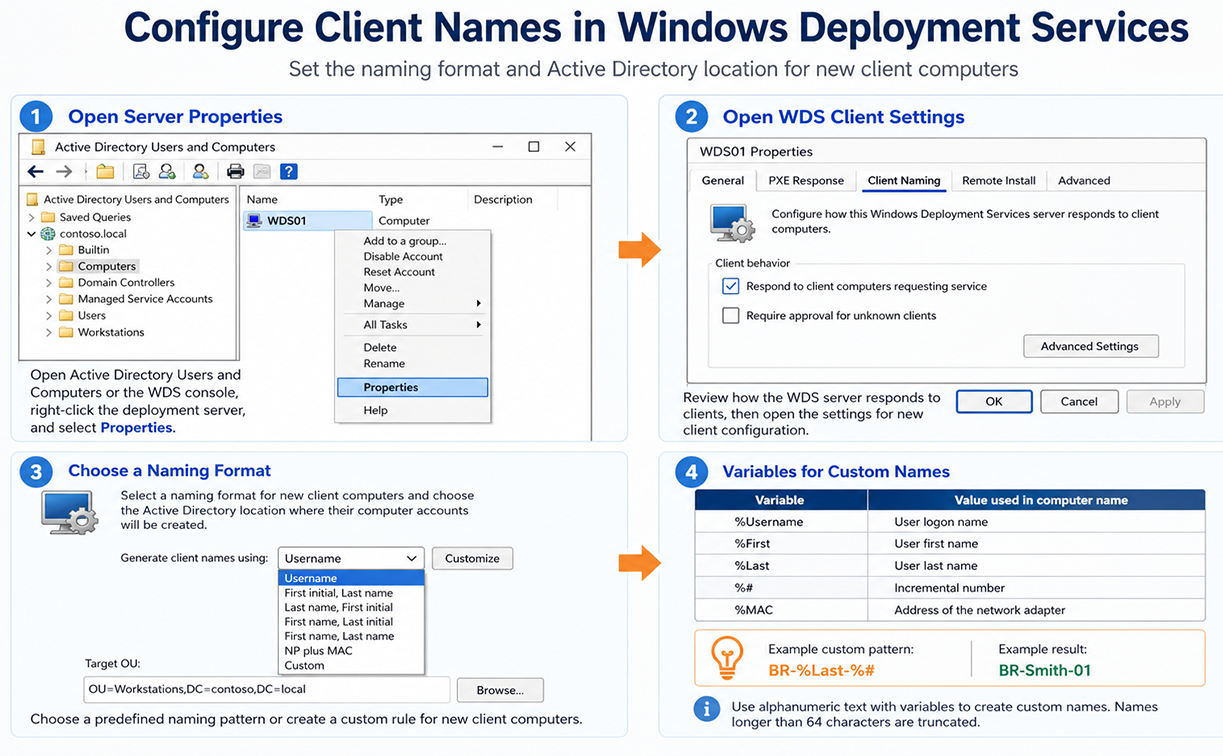
The figure should be read as a deployment-control diagram. The WDS server does not simply provide an image. It participates in a larger administrative process in which the computer name, directory location, and deployment policy determine how the rebuilt machine becomes manageable after installation.
Active Directory Computer-Account Location
When WDS creates or uses a computer account, that account must exist somewhere in Active Directory Domain Services. The location is important because it affects Group Policy, administrative delegation, security baselines, and organizational management. A computer placed in the wrong location may miss required policy settings or receive settings intended for another department or site.
Microsoft’s WDS configuration supports specifying where new client computer accounts are created in Active Directory. The location can be based on the WDS server domain, the domain or OU of the user performing the installation, or a custom OU. The preferred choice depends on how tightly the organization controls deployment.
Default Directory Service Location
The default directory service location creates new computer accounts in the default domain computer location, commonly the Computers container. This can be acceptable in a small lab or basic training environment, but it is usually less precise than using a dedicated OU.
The Computers container is not the same as a normal OU for Group Policy design. In many production environments, administrators prefer dedicated OUs so that Group Policy, delegation, and administrative structure can be applied more predictably.
Same Location as the User Setting Up the Computer
Another option is to create the new computer account in the same directory location as the account performing the deployment. This may be convenient when deployment responsibility is tied to a department or site, but it can also produce inconsistent results.
For example, if several technicians from different OUs deploy replacement computers, the resulting computer accounts may be created in different locations. That may not be what the recovery plan expects. This option should therefore be used cautiously and only where the administrative model supports it.
Specific Directory Service Location
A specific directory service location is usually the best option for controlled deployments. The administrator selects a known OU where new or rebuilt computer accounts should be created. This supports predictable Group Policy application, cleaner delegation, and better disaster recovery documentation.
Example OU paths might include:
OU=Workstations,OU=Recovery,DC=example,DC=local
OU=Staging,OU=Computers,DC=example,DC=local
OU=TrainingLab,OU=Devices,DC=example,DC=local
A dedicated staging or recovery OU can be especially useful. Rebuilt machines can first land in a controlled location, receive baseline settings, and then be moved to their final department or site OU after validation.
Computer Account Location Options
The following table modernizes the legacy computer-account location options.
| Option | Modernized Description |
| Default directory service location | Creates new computer accounts in the default domain computer location, commonly the Computers container. This is simple, but it may not apply the same Group Policy structure or delegation model as a dedicated OU. |
| Same location as the user setting up the computer | Creates new computer accounts in the same directory location as the account performing the deployment. This may be convenient, but it can produce inconsistent placement when different technicians or users perform deployments. |
| A specific directory service location | Creates new computer accounts in a specified OU. This is usually preferred for controlled WDS deployments because it supports predictable Group Policy, delegation, staging, and recovery workflow. |
Naming and OU Placement in Disaster Recovery
Naming and OU placement become especially important during recovery. When systems are rebuilt under time pressure, administrators need a predictable process. If a replacement computer receives an unclear name or lands in the wrong location, the recovery team may lose time troubleshooting policy, management, or access problems.
Good naming and placement policies support:
- Inventory tracking after the rebuild.
- Uniqueness of computer accounts.
- Correct Group Policy application.
- Security baseline assignment.
- Department, site, or role-based management.
- Clear recovery documentation.
- Faster troubleshooting after deployment.
For disaster recovery, the naming convention and OU placement should be included in the recovery runbook. The runbook should explain what name pattern to use, which OU receives rebuilt systems, who has permission to create the computer account, and how the result is validated.
Relationship to Controlled WDS Deployments
Client naming and computer-account location are part of a larger controlled deployment model. In some environments, WDS may respond to unknown clients with administrator approval. In more restricted environments, administrators may prestage known client computers before deployment. In lab environments, the process may be more flexible.
Pre-staging should not be presented as mandatory for every WDS client. It is better understood as an optional control used when the organization wants stricter security, predictable naming, known-client behavior, or precise OU placement. This distinction is important because the next lesson focuses on controlled WDS deployments rather than treating pre-staging as a universal requirement.
The next lesson explains how known clients, pre-staging, approval workflows, and PXE response policy can be used to control Windows Deployment Services deployments.
Summary
WDS installation options help administrators control how deployment-created computers are named and where their Active Directory accounts are placed. These settings affect inventory, Group Policy, security baselines, delegation, and recovery operations.
A good WDS naming policy should produce unique and meaningful names. A good computer-account placement strategy should put rebuilt or newly deployed systems in the correct OU. Together, these settings make deployment more predictable and make disaster recovery easier to manage.
For modern Windows Server 2025 environments, WDS should be understood as one part of the deployment ecosystem. Some operating system deployment workflows that rely directly on installation-media boot.wim are deprecated or blocked, so administrators should verify current support guidance and consider tools such as Microsoft Configuration Manager, MDT, or custom boot images where appropriate. The naming and OU-placement principles remain valuable because every recovery workflow still needs predictable identity, location, and management after deployment.