| Lesson 4 | Enable WDS Server and User accounts |
| Objective | Authorize the WDS server and assign user permissions. |
Enable WDS Server and User Accounts
Enabling Windows Deployment Services for production or recovery use requires more than starting the WDS service. The supporting DHCP and PXE infrastructure must be validated, the WDS server must be configured to respond only to appropriate clients, and user permissions must be delegated carefully. In a disaster recovery environment, these controls help ensure that approved administrators can rebuild systems from trusted images while preventing unauthorized deployment activity.
The legacy version of this lesson described authorizing a Remote Installation Services server in Active Directory. That RIS-centered model belongs to the Windows 2000 era. In a modern Windows Server 2025 lesson, the more accurate explanation separates three related but different tasks: validating DHCP authorization, configuring WDS PXE response behavior, and assigning user or group permissions for deployment operations.
This distinction matters because deployment infrastructure is powerful. A deployment server can provide boot images, install operating systems, expose image repositories, and support domain-joined replacement computers. If those functions are not controlled, an organization could accidentally allow unauthorized systems, unapproved images, or excessive administrative access into the recovery process.
Why Authorization and Permissions Matter
Windows Deployment Services helps administrators rebuild failed systems, provision replacement computers, restore lab machines, and deploy standardized Windows images. Those capabilities are useful in disaster recovery, but they also create risk. A misconfigured deployment environment can install the wrong image, expose sensitive installation files, permit unknown devices to start deployment, or allow users to create computer accounts in the wrong location.
For that reason, WDS should be treated as controlled recovery infrastructure. Administrators should know which DHCP server supports PXE clients, which WDS server responds to deployment requests, which users can manage images, which groups can approve pending devices, and which organizational unit receives newly created computer accounts.
The goal is not to give every technician broad domain rights. The goal is to apply least privilege. Users should receive only the permissions needed to perform their deployment role, and those permissions should be delegated through security groups whenever possible.
Correcting the RIS-Era Authorization Model
Older RIS training material often compared RIS authorization to DHCP authorization. That comparison was useful historically, but it can be misleading when applied directly to Windows Deployment Services. In an Active Directory domain, DHCP authorization applies to Windows DHCP servers. A DHCP server must be authorized before it can lease addresses in the domain.
WDS depends on PXE and network boot behavior. Therefore, administrators must verify that the DHCP infrastructure supporting PXE clients is authorized and functioning. Separately, the WDS server must be configured to respond to the correct PXE clients, and access to WDS administration must be secured.
A clearer modern model is:
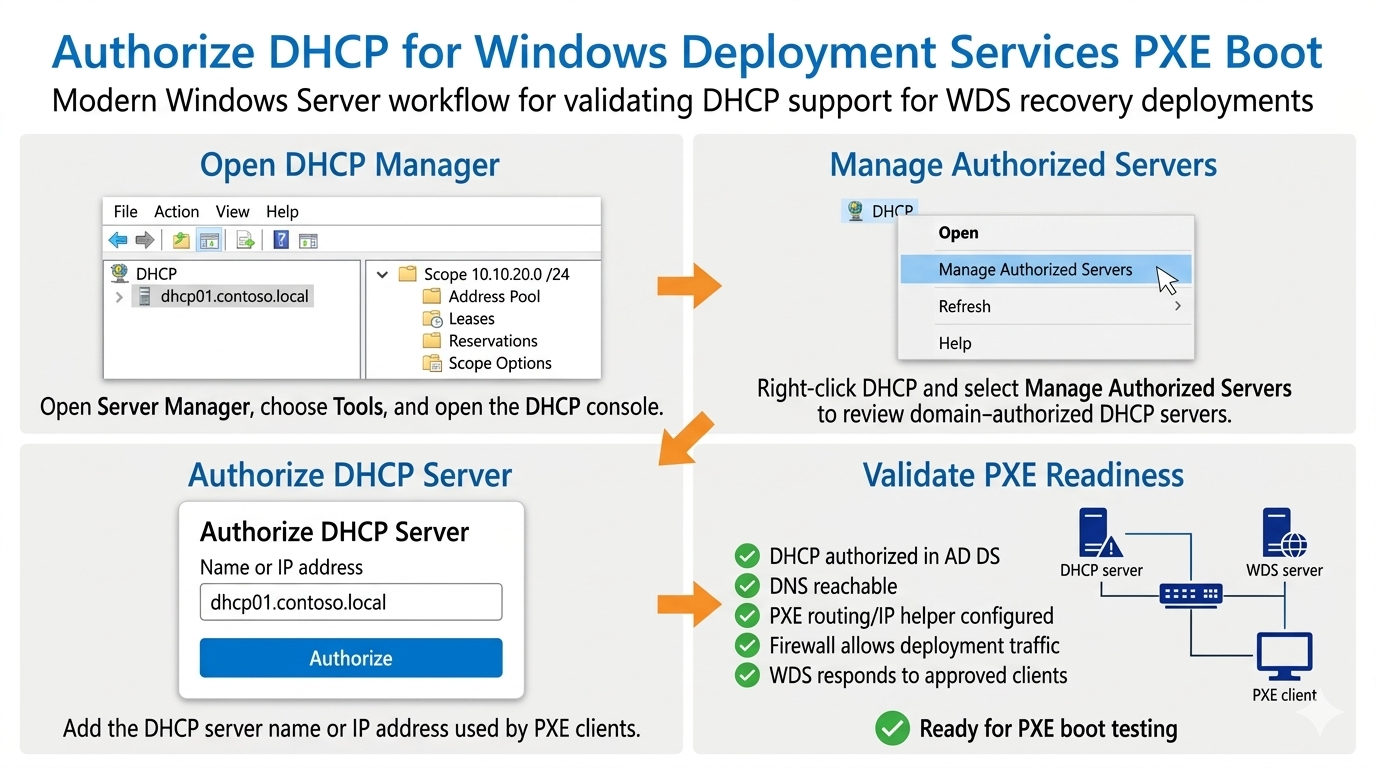
- Authorize and validate DHCP: Ensure that the Windows DHCP server supporting PXE clients is authorized in Active Directory and able to provide network configuration.
- Validate PXE routing: Confirm DNS, routing, IP helper configuration, and firewall rules so PXE clients can reach the required services.
- Configure WDS response policy: Decide whether WDS responds to known clients, unknown clients, or only approved devices.
- Delegate user permissions: Assign limited rights for image management, device approval, computer-account creation, and domain-join workflows.
DHCP Authorization and PXE Readiness for WDS
PXE clients require network configuration before they can contact deployment services. In many Windows environments, DHCP provides the IP address and related network information. If the DHCP server is not authorized, unreachable, or incorrectly configured, PXE boot may fail before WDS becomes part of the process.
Administrators should verify the following before treating WDS as recovery-ready:
- The DHCP server that supports the PXE client subnet is authorized in Active Directory.
- DNS is reachable and functioning correctly.
- PXE traffic can reach the appropriate WDS or PXE responder infrastructure.
- IP helper or routing configuration exists where clients and deployment services are on different subnets.
- Firewall rules permit the traffic required for PXE and WDS deployment.
- The WDS server response policy matches the organization’s deployment-security requirements.
WDS Server Response Policy
After the supporting network services are validated, the WDS server response policy determines which PXE clients receive deployment service. This is one of the most important security decisions in a WDS environment.
A WDS server may be configured to avoid responding to clients, respond only to known clients, respond to all clients, or require administrative approval for unknown devices. The correct setting depends on the environment. A classroom or isolated lab may use a more permissive configuration. A production network should normally use tighter controls, such as known-client deployment, prestaged computers, or approval workflows for unknown clients.
In disaster recovery, this policy should be documented. The recovery team should know whether replacement computers must be prestaged, whether pending devices require approval, and who is allowed to approve them. Without that clarity, recovery work can stall during an outage.
Assigning WDS Administrative Permissions
WDS administration should be assigned through groups rather than direct user permissions whenever possible. Group-based delegation is easier to audit, easier to change, and safer when staff roles change. Instead of giving every technician broad administrative rights, create groups that match operational responsibilities.
Example groups include:
- WDS-Admins: Administrators who can manage the WDS server, configure response settings, and maintain the deployment infrastructure.
- WDS-Image-Maintainers: Administrators who can add, remove, update, and document boot images, install images, drivers, and unattended installation files.
- WDS-Deployers: Technicians who can perform approved deployments but should not modify the image repository.
- HelpDesk-Computer-Rebuild: Support personnel who can rebuild replacement computers within a controlled OU and documented recovery process.
These groups can then be assigned permissions in WDS, Active Directory, file system security, and related deployment tools. This supports least privilege while still allowing the recovery team to work efficiently.
Delegating Computer Account Creation in Active Directory
Deployment users may need permission to create or join computer accounts in Active Directory. The legacy lesson stated that users can be assigned permissions to create computer objects anywhere in the domain or in a specific organizational unit. In a modern environment, the preferred approach is to delegate rights to a specific OU rather than allowing broad computer creation across the domain.
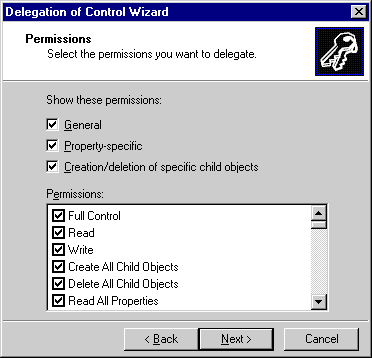
Active Directory Users and Computers provides the Delegation of Control Wizard for this purpose. An administrator can right-click the target OU, start the wizard, select the user or group, and delegate a limited set of permissions.
Common delegated permissions may include:
- Create Computer objects in a specific OU.
- Read selected computer-object properties.
- Write selected computer-object properties if required by the deployment workflow.
- Join or manage computer accounts according to organizational policy.
The safest design is to create a dedicated OU for rebuilt or newly deployed computers. Deployment technicians can receive limited rights in that OU without receiving unnecessary authority over the rest of the domain.
Prestaged Computers and Known Clients
Prestaging is the process of creating a computer account before the computer is deployed. In a WDS environment, prestaging can help the administrator control which physical or virtual machines are allowed to receive deployment service.
Prestaged computers are useful when the organization wants to avoid automatically responding to unknown devices. A known-client workflow can reduce deployment risk because the WDS server responds only to computers that the administrator has already prepared in Active Directory.
Prestaging also supports replacement-computer planning. For example, if a failed workstation is being replaced, the replacement computer can be assigned to the correct OU, given an approved naming convention, and deployed using the appropriate image. This helps the recovery process remain controlled instead of improvised.
Securing Image and RemoteInstall Folder Access
The WDS image repository and RemoteInstall folder should be protected carefully. Deployment clients need access to boot and install resources during deployment, but ordinary users should not be able to modify images, drivers, unattended setup files, or scripts.
Administrators should separate read access from management access. Deployment clients and approved deployment operators may need read access. Image maintainers and WDS administrators may need modify or full-control permissions, depending on their role. Those permissions should be assigned to groups and reviewed periodically.
A poor permission model can damage recovery readiness. If too many users can modify images, the organization may not know whether an image is trustworthy. If too few users can access deployment resources during an outage, recovery may be delayed. The correct model balances security with operational availability.
Recovery Runbook Checklist
A WDS recovery runbook should document the permissions and infrastructure needed to rebuild systems. The runbook should be clear enough that another administrator can follow it during an outage.
- Identify the DHCP server that supports PXE clients.
- Confirm that the DHCP server is authorized in Active Directory.
- Verify DNS, routing, IP helper configuration, and firewall rules.
- Identify the WDS server that responds to deployment clients.
- Document the WDS PXE response policy.
- List the groups that can manage WDS images.
- List the groups that can approve pending devices.
- Identify the OU where rebuilt computers are created.
- Document the group delegated to create computer objects in that OU.
- Identify which image should be used for each recovery scenario.
- Document who validates the rebuilt system.
- Record the deployment result and update the runbook if problems are discovered.
This checklist turns WDS security and permission management into part of the disaster recovery process rather than an afterthought.
Exercise Transition
The exercise for this lesson remains useful if it is treated as a modernization exercise. Instead of thinking in terms of RIS practices, use the exercise to test whether you understand how deployment infrastructure should be controlled, how DHCP/PXE readiness supports WDS, and how permissions should be delegated for computer-account creation.
Configure WDS Server - Exercise
Configure WDS Server - Exercise
Summary
Enabling WDS for recovery use requires both infrastructure validation and permission control. DHCP authorization applies to the Windows DHCP server that supports PXE clients. WDS response settings control how the deployment server responds to known, unknown, or approved clients. Active Directory delegation controls who can create or manage computer accounts during deployment.
The safest design uses least privilege, security groups, prestaged computers where appropriate, and delegated permissions in specific organizational units. This approach allows approved administrators and technicians to rebuild systems from trusted images while reducing the risk of unauthorized deployment activity.
The next lesson provides an overview of configuring remote installation options and how to configure client and computer names and locations.