| Lesson 2 | Examine Windows Deployment Services. |
| Objective | Examine Windows Deployment Services for Windows Server 2025 |
Examine Windows Deployment Services for Windows Server 2025
Windows Deployment Services, or WDS, is a Windows Server role used to deploy Windows operating systems across the network. In earlier Microsoft training material, this topic was introduced through Remote Installation Services, or RIS, which allowed Windows 2000 Professional computers to be installed remotely during startup. That RIS-centered model is now historical. The modern instructional focus should be Windows Deployment Services, PXE-based startup, Windows PE boot images, install images, driver support, and standardized recovery-oriented deployment.
WDS is important in a disaster recovery course because recovery is not limited to restoring files from backup. A recovery plan may also require rebuilding a failed workstation, provisioning replacement hardware, restoring a classroom or lab to a known baseline, or deploying a standard Windows Server image before data and applications are restored. WDS supports that process by giving administrators a centralized way to start a computer from the network and apply an approved Windows image.
This lesson examines WDS from the standpoint of modern Windows Server administration. The goal is not to preserve obsolete RIS assumptions, such as Windows 2000 Professional-only deployment or Winnt.exe-based installation. The goal is to understand how a WDS server supports network startup, deployment images, supporting network services, and replacement-computer scenarios in a Windows Server 2025 environment.
From RIS to Windows Deployment Services
Remote Installation Services was a Windows 2000-era technology that allowed client computers to connect to a server during startup and remotely install Windows. It was useful for its time because it reduced the need for local installation media and allowed operating system installation to be managed from a network server. However, RIS was tightly connected to older Windows deployment assumptions and limited operating system targets.
Windows Deployment Services succeeded that model by supporting image-based deployment. Instead of thinking in terms of a single Windows 2000 Professional installation source, administrators now think in terms of boot images, install images, Windows PE, WIM files, PXE boot, drivers, and centralized image repositories. This shift is important because modern deployment is less about running a manual setup program and more about applying a controlled operating system image through a repeatable process.
In this modernized lesson, RIS should be understood only as historical background. WDS is the relevant technology for understanding network-based Windows deployment in a disaster recovery course.
What Windows Deployment Services Does
Windows Deployment Services allows supported computers to boot from the network and receive deployment resources from a WDS server. A client computer uses PXE startup to contact the network deployment infrastructure. The WDS server then provides a boot image, usually based on Windows PE, so that the client can enter a temporary installation or recovery environment. From there, the administrator can select and apply an approved Windows image.
WDS does not replace backup software, application recovery tools, database restore procedures, or cloud failover services. Instead, it solves a specific recovery and deployment problem: how to rebuild or provision Windows systems from standardized images without manually installing the operating system on each machine.
In a disaster recovery plan, WDS may be combined with other tools. WDS can deploy the base operating system. Group Policy can apply domain configuration. Endpoint management tools can install applications and security settings. Backup software can restore user data or server data. A recovery runbook can describe the order in which these steps should occur.
How WDS Supports Disaster Recovery
A disaster recovery plan must account for failed hardware, corrupted systems, malware recovery, misconfigured computers, and replacement-device provisioning. If administrators rebuild systems manually every time, the recovery process becomes slow and inconsistent. WDS improves that process by allowing a machine to be rebuilt from a known image.
For example, if a workstation fails, the organization may provide a replacement computer. That replacement computer can start from the network, contact the WDS server, and receive an approved Windows image. After the operating system is installed, the computer can receive security policy, applications, user data, and other required configuration through additional management or recovery tools.
This approach is valuable because it reduces improvisation. During an outage, administrators should not have to search for installation media, guess which version of Windows to install, locate drivers manually, or rebuild configuration from memory. A tested WDS process gives the organization a repeatable recovery path.
Windows Deployment Services Overview
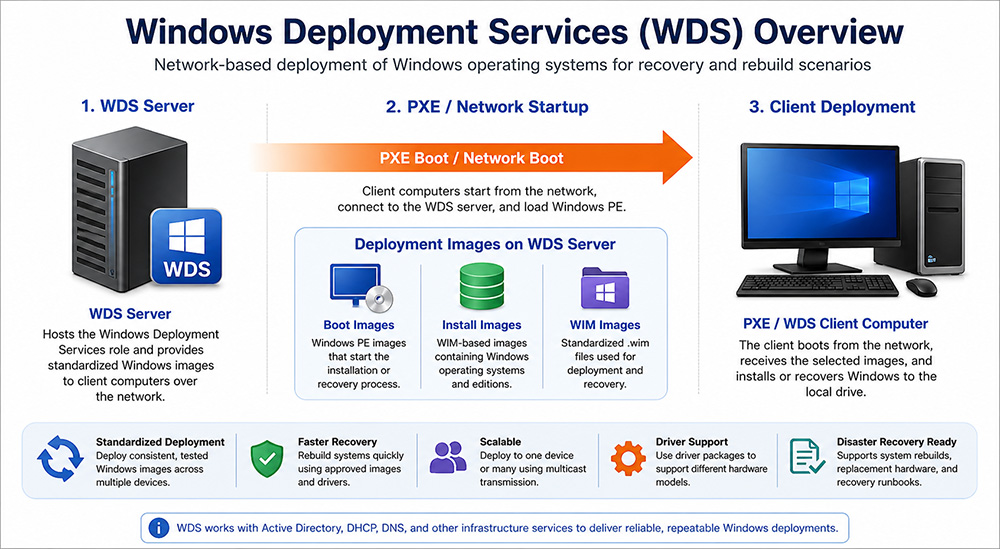
The WDS workflow begins with the deployment server. The WDS server stores boot images, install images, and optional driver packages. A PXE-capable client computer starts from the network and contacts the deployment service during startup. The client then loads a boot environment, usually based on Windows PE, and receives the selected Windows image.
The image repository is central to the process. A properly managed image repository allows administrators to deploy consistent Windows configurations across multiple devices. In a recovery context, that consistency is often more important than speed alone. A quickly rebuilt computer is only useful if it is rebuilt correctly.
PXE Startup and Client Connection
PXE, or Preboot Execution Environment, allows a computer to start from the network before a local operating system is available. This is one of the core ideas behind WDS. Instead of inserting a USB drive or mounting installation media manually, the administrator can configure the computer to boot from the network.
During PXE startup, the client receives network configuration and contacts the deployment environment. In a typical environment, DHCP provides IP address information, while DNS and other network services support name resolution and communication. The WDS server responds to the deployment request and provides the boot resources needed to continue.
PXE startup is especially useful in replacement-computer scenarios. A new or unformatted computer can be connected to the network, started through PXE, and deployed with an approved Windows image. For disaster recovery, that means a failed machine can be replaced more quickly and with less manual installation effort.
Boot Images and Windows PE
A boot image starts the client into a temporary deployment environment. In WDS, this environment is commonly based on Windows Preinstallation Environment, or Windows PE. Windows PE is a lightweight operating environment used for setup, imaging, recovery, and maintenance tasks.
The boot image is not the final Windows operating system image. It is the environment that allows deployment to begin. Once the client is running in Windows PE, the administrator or deployment process can prepare storage, connect to the image repository, and apply the selected install image.
In a recovery plan, boot images must be maintained carefully. They may need network drivers, storage drivers, scripting support, or other components so that they can work with the organization’s hardware. If the boot image cannot recognize the network adapter or storage controller in replacement hardware, deployment may fail before the install image is ever applied.
Install Images and Operating System Choices
Install images contain the Windows operating system that will be deployed to the target computer. These images are commonly stored as WIM files. A WIM-based image can contain a Windows operating system configuration that is applied to a computer during deployment.
In the old RIS model, the instructional focus was on remotely installing Windows 2000 Professional. In a modern WDS lesson, the focus is broader. The administrator may maintain approved Windows client images, Windows Server images, lab images, classroom images, or recovery images. The important point is that the deployment choices should be controlled, documented, and tested.
Operating system choices in WDS should not become an unmanaged collection of outdated images. Each image should have a purpose. For example, one image may support a standard workstation baseline, another may support a lab environment, and another may support a server rebuild process. Each image should be patched, reviewed, and validated before it is treated as recovery-ready.
Capture Images and Reference Computers
WDS can also be used with captured images. A reference computer is configured with a desired baseline, and that configuration can be captured into an image for later deployment. This is useful when an organization wants systems to start from the same known configuration.
Reference images should be built carefully. A poor reference image can spread configuration mistakes across many computers. A good reference image should be clean, generalized, patched, documented, and tested on the target hardware. It should avoid machine-specific settings that would cause problems when deployed to other systems.
In a disaster recovery scenario, captured images may support fast restoration of lab machines, training-room systems, or standardized workstations. They may also support the first stage of rebuilding a server before application-specific recovery steps are performed.
Replacement-Computer Scenarios
The legacy RIS lesson described a scenario in which a user receives an unformatted replacement computer and uses remote installation technologies to regain access to an operating system, applications, settings, and documents. That instructional idea is still valuable, but the technology stack should be modernized.
In a current environment, a replacement computer may receive its Windows image through WDS. After deployment, domain membership, Group Policy, endpoint management, software deployment, user profile restoration, cloud synchronization, or backup restoration may complete the recovery process. WDS handles the operating system deployment portion. Other tools restore configuration, applications, and data.
This distinction is important. WDS can help rebuild the machine, but it does not automatically solve every user recovery problem. User data, application state, licensing, cloud identity, endpoint security, and management enrollment must also be included in the recovery process.
Network Services Required by WDS
WDS depends on supporting network services. In many Windows Server environments, those services include DHCP, DNS, and Active Directory Domain Services. These services may run on the same server in a small lab, but production environments commonly separate them according to administrative and availability requirements.
- DHCP: DHCP provides IP address information to client computers during network startup. Without address assignment, PXE clients may not be able to communicate with the deployment infrastructure.
- DNS: DNS provides name resolution so that clients and servers can locate required services. In domain environments, DNS is also closely tied to Active Directory functionality.
- Active Directory Domain Services: AD DS may be used for domain integration, authorization, server discovery, and administrative control in domain-based deployments.
- Network routing and firewall rules: WDS traffic must be able to move between the client network and the deployment server. VLANs, routers, switches, and firewall rules can affect whether PXE startup succeeds.
- Permissions: Administrators must control who can manage images, approve client computers, and perform deployment operations.
These dependencies matter for disaster recovery. If DHCP, DNS, or directory services are unavailable, the WDS workflow may not function. A recovery plan that depends on WDS should also describe how the supporting network services are protected and restored.
Storage and Image Repository Planning
The old RIS material described a fixed disk space requirement for Windows 2000 Professional source files. That type of requirement should not be treated as current guidance. Modern image storage depends on the number, size, and retention needs of boot images, install images, captured images, driver packages, and image versions.
A WDS server should have enough storage for current images and for the operational process used to maintain those images. Administrators may need separate space for testing, staging, retired images, and driver repositories. Storage should also be protected because the image repository is part of the organization’s recovery infrastructure.
The file system and storage design should support reliability, permissions, backup, and operational performance. Administrators should document where images are stored, who can modify them, how image versions are named, and how older images are retired.
WDS and Modern Deployment Tools
WDS remains useful for PXE-based and on-premises image deployment, but it should not be treated as the only modern deployment option. Microsoft Configuration Manager may be used for enterprise operating system deployment and task-sequence automation. Microsoft Intune and Windows Autopilot are commonly used for cloud-managed endpoint provisioning, reset, repurposing, and recovery. Azure Backup and Azure Site Recovery are separate recovery technologies used for data protection, workload recovery, and failover scenarios.
A Windows Server 2025 disaster recovery course should therefore present WDS accurately: it is still relevant for network-based deployment and certain recovery-oriented rebuild scenarios, but it belongs inside a larger deployment and recovery ecosystem. The correct tool depends on the business requirement, the device type, the network design, and the recovery objective.
Administrators should also be aware that Microsoft has placed limitations on some WDS end-to-end deployment workflows that rely directly on boot.wim from newer installation media. This does not remove the educational value of WDS, but it does mean that modern deployment planning should verify support status and consider alternatives such as Configuration Manager, custom boot images, Autopilot, Intune, or other supported deployment methods where appropriate.
Recovery Runbook Considerations
A WDS-based recovery process should be documented in a runbook. The runbook should explain when WDS is used, which image should be selected, what hardware is supported, which drivers are required, and what must happen after Windows is deployed.
A simple WDS recovery runbook may include the following steps:
- Confirm that the target system should be rebuilt or replaced.
- Verify that the WDS server and image repository are available.
- Confirm that DHCP, DNS, and required network paths are functioning.
- Start the target computer using PXE/network boot.
- Select the approved boot image and install image.
- Apply the Windows image to the target computer.
- Confirm that required drivers are installed.
- Join the system to the domain or enroll it in the required management platform.
- Apply Group Policy, endpoint security, and baseline configuration.
- Restore user data, applications, or server data using the appropriate recovery tools.
- Validate that the rebuilt system satisfies the recovery requirement.
- Document the result and update the recovery plan if problems were discovered.
Testing is essential. A WDS process that has not been tested may fail because of missing drivers, incorrect boot settings, unsupported hardware, network misconfiguration, outdated images, or unclear instructions. Disaster recovery planning should include regular validation of the deployment process.
Summary
Windows Deployment Services provides a network-based method for deploying Windows operating systems. It replaces the older RIS-centered model with an image-based deployment approach that uses PXE startup, Windows PE boot images, install images, WIM files, driver packages, and supporting network services.
In a disaster recovery context, WDS is valuable because it supports repeatable rebuilding of systems from standardized images. It can help administrators provision replacement computers, restore lab or classroom systems, rebuild Windows Server baselines, and reduce the errors associated with manual installation.
WDS should be understood as one tool within a broader recovery and deployment architecture. Modern environments may also use Configuration Manager, Intune, Windows Autopilot, Azure Backup, Azure Site Recovery, and other deployment or recovery tools. The administrator’s responsibility is to understand where WDS fits, test the process, document the workflow, and ensure that recovery images and supporting network services are ready before an outage occurs.