| Lesson 3 | Configuring and starting WDS |
| Objective | Install and configure WDS on Windows Server 2025 |
Install and Configure WDS on Windows Server 2025
Configuring and starting Windows Deployment Services, or WDS, prepares a Windows Server to provide PXE-based deployment services to client computers. In a disaster recovery course, this matters because recovery is not limited to restoring files from backup. Administrators may also need to rebuild failed systems, provision replacement devices, restore lab computers to a known baseline, or deploy a standard Windows Server image before applications and data are restored.
WDS supports this recovery requirement by allowing computers to start from the network and receive deployment resources from a centralized server. The WDS server can provide boot images, install images, driver support, multicast deployment, and controlled PXE response behavior. When the service is configured correctly, an administrator can rebuild a supported computer without manually installing Windows from local media.
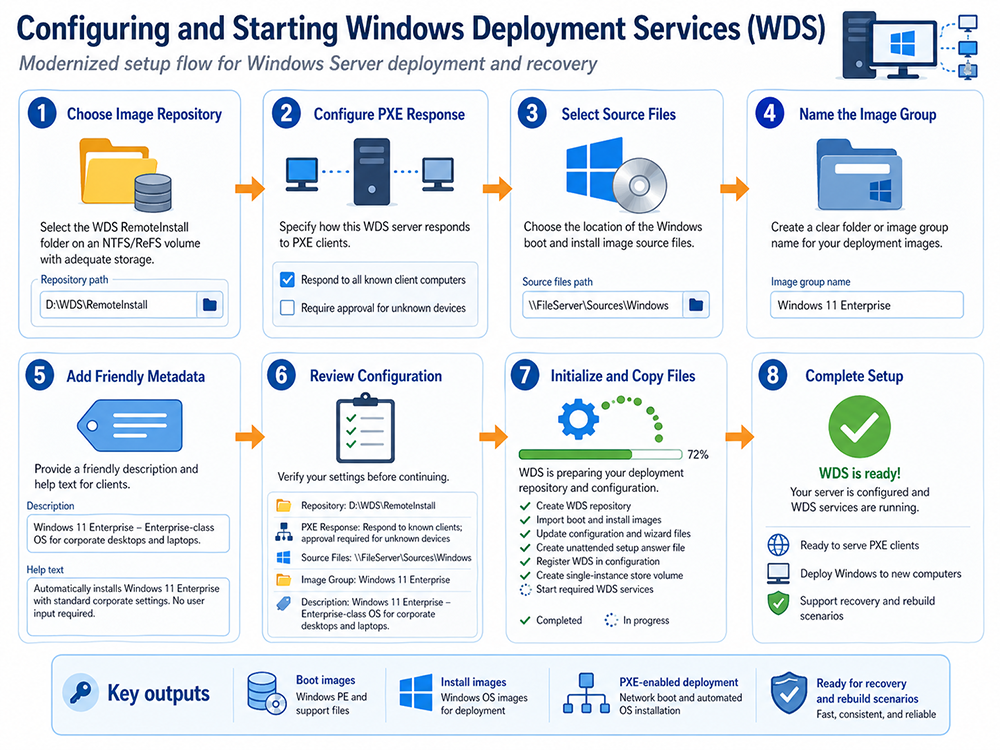
This lesson explains the major configuration sequence: install the WDS role, choose an image repository, configure PXE response behavior, select boot and install image sources, name image groups, review settings, initialize the repository, start the services, and validate PXE deployment. The purpose is not merely to click through a wizard. The purpose is to prepare WDS as a tested deployment and recovery component.
Why Configuring WDS Matters in Disaster Recovery
Installing the WDS role is only the beginning. A WDS server is not useful until it has been configured to store deployment content, respond to appropriate clients, provide valid boot images, provide approved install images, and communicate with the supporting network services. In a recovery event, these details determine whether the recovery team can rebuild systems quickly or whether it loses time troubleshooting missing images, driver failures, DHCP problems, or unclear deployment procedures.
A recovery-oriented WDS configuration should answer several questions. Where are images stored? Who can modify them? Which clients may boot from the server? Which image should be used for a workstation rebuild? Which image should be used for a server baseline? Are the required drivers available? Has PXE boot been tested on the hardware models the organization actually uses? Is the process documented in a recovery runbook?
These questions are operational, not theoretical. A WDS server that has not been tested may look complete in the console but fail during an emergency. Disaster recovery planning should therefore treat WDS configuration as part of readiness validation.
From RIS to WDS
Remote Installation Services, or RIS, was the older Microsoft technology used for remote operating system installation in Windows 2000-era environments. RIS allowed client computers to connect to a server during startup and install Windows across the network. Windows Deployment Services replaced that older model with a more image-based deployment approach.
WDS uses modern deployment concepts such as PXE startup, Windows PE boot images, WIM-based install images, driver integration, multicast transmission, and optional unattended installation. The lesson should therefore focus on WDS rather than preserving RIS-specific details such as Windows 2000 Professional installation, Winnt.exe, or old Remote Installation Services wizard behavior.
Install the Windows Deployment Services Role
The first task is to install the Windows Deployment Services role on the server that will provide deployment services. In Server Manager, the administrator uses Add Roles and Features, selects Windows Deployment Services, and installs the appropriate role services.
WDS includes two role services:
- Deployment Server: Provides the full WDS deployment functionality, including PXE boot support, image management, and operating system deployment services.
- Transport Server: Provides lower-level transport functionality and can be useful in specialized deployment scenarios where full Deployment Server functionality is not required.
In most instructional and recovery-oriented WDS scenarios, the Deployment Server role service is the main focus. After the role is installed, the server must still be configured before it can respond to PXE clients and deploy images.
Select the Image Repository or RemoteInstall Folder
During configuration, WDS requires a location for its deployment content. This location is commonly referred to as the RemoteInstall folder or image repository. It stores boot images, install images, configuration files, and other deployment resources.
The repository should be placed on a dedicated data volume rather than casually placed on the system volume. This separation helps with storage management, backup planning, performance, and operational clarity. The volume should have enough space for current images, future image versions, driver packages, captured images, and staging work.
A practical repository path might resemble the following:
D:\RemoteInstallIn a disaster recovery environment, the repository itself should be protected. If WDS is part of the recovery plan, then the WDS server, image repository, image naming scheme, driver repository, and configuration documentation should also be recoverable.
Configure PXE Response Behavior
PXE response behavior controls how the WDS server responds when client computers request network boot service. This is a security-sensitive configuration choice because it determines which systems can receive deployment attention from the server.
A WDS server may be configured to respond broadly to client computers or to respond only to known or approved computers. Responding to many clients is convenient in labs and open staging environments, but it can be risky in production. Responding only to known clients or requiring approval for unknown clients gives administrators more control over which systems can start deployment.
For disaster recovery, the correct choice depends on the environment. A training lab may prioritize convenience. A production network may require stricter approval so that unauthorized systems cannot accidentally receive deployment services. The configuration should match the organization’s security model and recovery workflow.
Select Source Files, Boot Images, and Install Images
WDS deployment depends on boot images and install images. A boot image starts the client into a temporary deployment environment, usually based on Windows PE. An install image contains the Windows operating system that will be deployed to the target computer.
In many older WDS procedures, administrators selected files from Windows installation media, including:
sources\boot.wim
sources\install.wim
This remains useful as a conceptual explanation, but modern administrators must be careful. Microsoft has partially deprecated WDS operating system deployment workflows that rely directly on boot.wim from installation media. For newer Windows workflows, administrators may need custom boot images, Microsoft Configuration Manager, or another supported deployment approach. The educational point remains the same: WDS uses a boot environment and an install image, but the exact implementation must be verified against current Microsoft support guidance.
Name Image Groups and Add Image Metadata
After source files are selected, administrators should organize images into clear image groups. A good image group name helps prevent confusion during recovery. For example, an organization might use names such as:
Windows 11 Enterprise
Windows Server 2025 Baseline
Training Lab Workstations
Recovery Workstation Image
Image metadata is also important. Friendly descriptions and help text should explain the purpose of the image, the operating system edition, the intended hardware scope, and whether the image is intended for workstations, servers, labs, or recovery rebuilds. During a recovery event, vague image names increase the risk of choosing the wrong image.
A clear image description might say:
Windows 11 Enterprise baseline image for corporate desktops and laptops.
Includes standard configuration and is intended for recovery rebuilds.
Metadata should be treated as part of operational documentation. It helps administrators make correct deployment decisions when time is limited.
Review the Configuration Before Initialization
Before the server initializes WDS, the administrator should review the configuration. This is the point to confirm the repository path, PXE response behavior, source file location, image group name, image description, and deployment assumptions.
A review step prevents avoidable errors. If the repository is on the wrong volume, if the image group name is unclear, if the wrong source files were selected, or if PXE response behavior is too permissive, the administrator should correct the problem before WDS begins copying files and starting services.
In a recovery-focused environment, the review step should also ask whether the configuration matches the recovery runbook. The server should be configured according to documented recovery requirements, not improvised during setup.
Initialize WDS and Start Deployment Services
After configuration is reviewed, WDS initializes the repository and starts the required deployment services. The setup process may create the repository structure, copy required files, import or register images, update configuration, and start the services that allow WDS to respond to deployment requests.
Initialization should not be treated as the end of the process. A completed configuration screen only means that the server configuration finished. The administrator still needs to verify that the server is actually able to respond to PXE clients, present the correct boot image, display the correct install images, and complete deployment to supported hardware.
Add Boot Images and Install Images
Once the WDS server is configured, the administrator adds boot images and install images. Boot images are used to start the deployment environment. Install images contain the operating system that will be applied to the client computer.
A typical image workflow includes:
- Create or select an image group.
- Add a boot image used to start Windows PE or another supported deployment environment.
- Add one or more install images for approved operating system deployments.
- Add or organize driver packages where hardware support requires them.
- Document the intended use of each image.
- Test deployment using representative hardware.
In a recovery plan, image selection should be conservative. The administrator should know which image is approved for each recovery scenario. A workstation recovery image, a classroom rebuild image, and a server baseline image may have different purposes and should not be confused.
DHCP, DNS, Active Directory, Routing, and Firewall Considerations
WDS depends on the network. If the supporting services are misconfigured, deployment may fail even when the WDS server itself is installed correctly.
- DHCP: PXE clients need IP address information during network startup. DHCP design affects whether clients can locate the deployment infrastructure.
- DNS: DNS supports name resolution and domain-related communication.
- Active Directory Domain Services: AD DS may be used for domain integration, authorization, known-client behavior, and administrative control.
- Routing: PXE traffic across subnets may require proper router or IP helper configuration.
- Firewall rules: Required WDS and PXE traffic must be allowed between client networks and the deployment server.
Older setup procedures often focus on DHCP Options 66 and 67. Those options may appear in some environments, but they should not be presented as the universal best answer. In routed enterprise networks, IP helper configuration is often preferred because it allows PXE traffic to be forwarded appropriately without forcing a single boot file assumption across different firmware types or architectures.
Test PXE Deployment from a Client Computer
After WDS is configured, testing is mandatory. A server that has not been tested should not be considered recovery-ready. The administrator should boot a representative client computer, enable network boot in BIOS or UEFI settings if necessary, and confirm that the client can reach the WDS server.
A basic validation test should confirm the following:
- The client can obtain network configuration during PXE startup.
- The WDS server responds according to the configured PXE policy.
- The client can load the correct boot image.
- The expected install images are visible.
- Required network and storage drivers are available.
- The selected image can be applied successfully.
- The deployed system can complete post-installation configuration.
- The result matches the recovery runbook.
Testing should include the hardware models the organization expects to recover. A deployment process that works on one virtual machine may not work on a physical laptop, a server with a different storage controller, or a UEFI-only system with Secure Boot enabled.
WDS Limitations and Modern Deployment Alternatives
WDS remains useful for PXE-based, on-premises, and controlled image deployment scenarios, but it should not be treated as the only modern Windows deployment strategy. Modern organizations may also use Microsoft Configuration Manager, Microsoft Intune, Windows Autopilot, the Windows Assessment and Deployment Kit, DISM, and cloud recovery services.
Microsoft Configuration Manager can support enterprise operating system deployment and task sequences. Microsoft Intune and Windows Autopilot are commonly used for cloud-managed endpoint provisioning and reset scenarios. The Windows ADK and DISM provide tools for working with Windows images. Azure Backup and Azure Site Recovery address different recovery needs, such as protected workloads, data recovery, replication, and failover.
The important point is placement. WDS is still educationally and operationally relevant where PXE boot and network-based imaging are required. However, administrators should verify current support notes, especially when deploying newer Windows client or server operating systems using workflows that rely directly on installation-media boot.wim files.
Recovery Runbook Checklist
A WDS-based recovery process should be documented in a runbook. The runbook should allow another administrator to repeat the process without guessing.
- Confirm when WDS should be used instead of repair, reset, or cloud provisioning.
- Identify the WDS server and image repository.
- Confirm that required services such as DHCP, DNS, and AD DS are available.
- Verify PXE response behavior and client approval rules.
- Select the correct boot image.
- Select the correct install image or image group.
- Confirm driver support for the target hardware.
- Deploy the image to the target computer.
- Apply domain membership, Group Policy, endpoint security, and management enrollment.
- Restore required user data, server data, or applications using the appropriate recovery tools.
- Validate that the rebuilt system works correctly.
- Record any problems and update the runbook.
This checklist turns WDS from a one-time setup task into part of a repeatable disaster recovery process.
Summary
Configuring and starting Windows Deployment Services prepares a Windows Server to provide network-based deployment services. The configuration process includes installing the WDS role, selecting the image repository, configuring PXE response behavior, adding boot and install images, reviewing configuration, starting services, and validating client deployment.
In a disaster recovery course, WDS is important because it supports repeatable system rebuilds. It can help administrators recover failed systems, provision replacement computers, restore lab machines, and deploy standardized Windows images. However, WDS should be used with awareness of current Microsoft support limitations and should be positioned alongside other modern deployment and recovery tools.
The next lesson examines how to enable the Windows Deployment Services server and user accounts.