| Lesson 6 | Controlled WDS Deployments |
| Objective | Define Windows Deployment Services in controlled environments. |
Controlled WDS Deployments
Controlled Windows Deployment Services deployments determine which PXE clients can receive deployment service from a WDS server. In the original Remote Installation Services version of this lesson, the focus was pre-staging client computers. In a modern Windows Server environment, pre-staging should be understood as one control within a larger WDS deployment-security model.
Pre-staging is not required in every WDS environment. It becomes important when the organization wants to restrict deployment to approved computers, assign predictable names and Active Directory locations, prevent unknown machines from receiving operating system images, or require administrator approval before deployment begins. In other words, pre-staging is a security and management option, not a universal requirement.
This lesson explains known clients, unknown clients, pre-staged computer accounts, GUID or MAC-based identification, PXE response policy, administrator approval, and Active Directory computer-account placement. The goal is to help you decide when a controlled WDS deployment model is appropriate for disaster recovery and replacement-computer workflows.
Why Controlled WDS Deployments Matter
WDS can deploy operating system images over the network. That capability is powerful, but it also creates risk if it is not controlled. A deployment server can provide boot images, install images, and deployment instructions to computers that start from the network. If the WDS environment is too permissive, an unauthorized or unmanaged client could receive deployment service. If the environment is too restrictive, legitimate recovery systems may be blocked during an outage.
Controlled deployment is the balance between security and recovery speed. In a disaster recovery scenario, an administrator may need to rebuild a failed workstation, deploy a replacement computer, or restore a lab environment quickly. At the same time, the administrator must prevent unauthorized devices from receiving approved images or joining the domain improperly.
A controlled WDS deployment model helps answer these questions:
- Which PXE clients are allowed to receive deployment service?
- Are unknown clients blocked, approved manually, or allowed automatically?
- Should replacement computers be pre-staged before deployment?
- Which Active Directory OU receives newly deployed computer accounts?
- Which image is approved for each deployment scenario?
- Which administrator or group can approve devices or manage images?
Is Pre-Staging Required?
Pre-staging is not always required. Whether it is required depends on the WDS PXE response policy and the organization’s security model. If WDS is configured to respond only to known client computers, then the relevant computers must be known before deployment. That usually means they are pre-staged or otherwise represented in the deployment configuration.
If WDS is configured to respond to unknown clients, then pre-staging is not required for every client. However, the organization may still require administrator approval before an unknown client receives deployment service. This approval model provides a middle ground between a fully open deployment environment and a strict known-client-only environment.
The practical rule is simple: use pre-staging when you need stronger control. Avoid presenting it as mandatory for every WDS deployment.
Known Clients, Unknown Clients, and PXE Response Policy
A known client is a computer that the deployment infrastructure already recognizes. In many WDS workflows, this means the computer has been linked to an Active Directory computer account or prestaged device record. An unknown client is a machine that requests PXE service but has not yet been recognized, prestaged, or approved.
WDS response policy determines what happens when a client requests network boot. A controlled environment may use one of several approaches:
- Known clients only: WDS responds only to computers that are already recognized. This is restrictive and security-oriented.
- Unknown clients with approval: Unknown clients can request service, but an administrator must approve them before deployment continues.
- All clients: WDS responds broadly. This may be acceptable in a lab or isolated staging network, but it is usually too permissive for production.
The correct policy depends on the environment. A classroom rebuild network may value speed and flexibility. A production disaster recovery workflow may require known-client behavior, administrator approval, or a dedicated staging OU.
What Pre-Staging Means in WDS
Pre-staging means creating or preparing the computer account before deployment and associating that account with a hardware identity. The deployment infrastructure can then recognize the client before an operating system image is applied.
In WDS terminology, prestaged clients are also known computers. A prestaged computer is linked to a computer account object in Active Directory Domain Services. Properties on that account can be used to control the installation for the client. This makes pre-staging useful when the organization wants predictable deployment behavior.
Pre-staging can support:
- Known-client-only PXE response policies.
- Predictable computer names.
- Controlled OU placement.
- Approval of specific replacement systems.
- Assignment to a preferred deployment server or deployment path.
- Security controls that prevent unmanaged devices from receiving images.
Pre-Staging for Security
Pre-staging is primarily a security and control mechanism. It helps prevent unknown devices from receiving operating system images without approval. In a modern environment, the risk is not “illegally installing Windows 2000 Professional,” as older RIS-era text suggested. The modern risk is unauthorized deployment of approved images, improper domain joining, unmanaged computer accounts, or exposure of deployment resources to devices that should not receive them.
A locked-down production environment may require pre-staging for all deployment clients. A recovery staging network may use administrator approval instead. A lab may allow unknown clients because the network is isolated and the risk is lower. The key is to align the WDS response policy with the organization’s security and recovery requirements.
Pre-staging can also support operational control. For example, a replacement computer can be associated with the correct computer account before it is imaged. That account can be placed in the correct OU so the rebuilt machine receives the intended Group Policy settings, security baseline, and administrative delegation.
GUID, UUID, MAC Address, and Hardware Identity
Older deployment lessons emphasized the globally unique identifier, or GUID[1], of the computer. Modern systems may expose a UUID or GUID through firmware, while some deployment workflows may use the network adapter MAC address or another hardware identity. The important point is that the administrator must use the identifier expected by the deployment process.
A client identifier may be found in several places:
- BIOS or UEFI firmware information.
- System inventory or asset-management records.
- Vendor service tags or asset labels, where applicable.
- WDS pending-device information after the machine attempts PXE boot.
- Network adapter MAC address information.
The old RIS startup-disk discussion should be treated as historical. Modern WDS workflows normally rely on PXE-capable firmware, UEFI configuration, and network boot support rather than RIS startup disks.
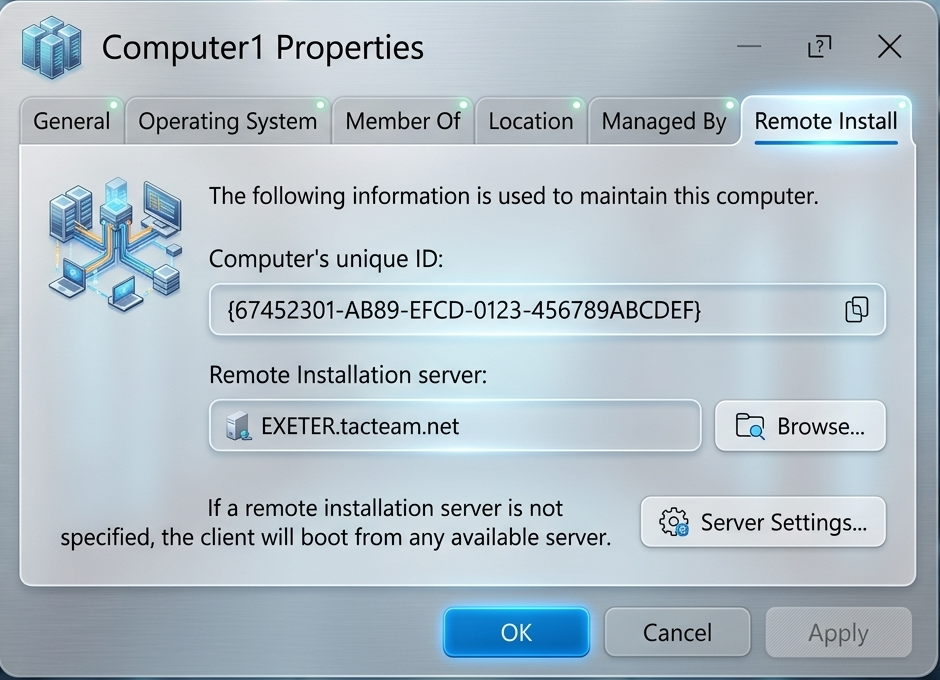
Locating a Client Identity
Before a client computer can be prestaged, the administrator must identify the system accurately. If the wrong hardware identifier is entered, the deployment server may not recognize the intended client, or the wrong machine may be associated with the prestaged account.
In a controlled recovery workflow, client identity should be recorded in the recovery runbook or asset-management system. For replacement hardware, the recovery team should know how to obtain the system UUID, firmware GUID, or MAC address before deployment begins. If the client appears as an unknown pending device after PXE boot, the administrator can use that pending record as part of the approval or prestaging process.
This identity step is especially important when multiple machines are being rebuilt at the same time. A lab, classroom, branch office, or recovery staging area may include many systems that look similar. Accurate hardware identity prevents the wrong system from receiving the wrong name, image, or OU placement.
Pre-Staging a Client Computer in Active Directory
The exact interface and labels may vary by server version and administrative tool, but the conceptual process is straightforward. The administrator prepares the computer account before deployment and associates it with the client identity.
A modernized pre-staging workflow can be described as follows:
- Open Active Directory Users and Computers.
- Select the target OU for deployment clients.
- Create a new computer account.
- Enter the intended computer name.
- Configure the account as a known or managed deployment client where supported.
- Associate the account with the client GUID, UUID, or MAC address.
- Optionally assign the client to a specific WDS server or deployment policy.
- Complete the configuration and test PXE deployment.
The target OU should be selected carefully. A recovery or staging OU may be preferable because it allows rebuilt systems to receive a predictable baseline before they are moved into their final department, site, or server-role OU.
Assigning a Client to a WDS Server or Deployment Path
The legacy RIS lesson described assigning a client computer to a designated RIS server. In a modern WDS lesson, this idea should be reframed as deployment targeting. Depending on the environment and available tools, a known client may be associated with a preferred deployment server, network boot program, unattended file, image selection behavior, or OU placement.
This is useful where multiple deployment servers or sites exist. A branch office may use a local WDS server to avoid imaging traffic across a WAN link. A lab may use a dedicated deployment server. A disaster recovery staging area may use a controlled WDS server that contains only approved recovery images.
The administrative goal is not simply load balancing. The goal is controlled and predictable deployment behavior.
Administrator Approval for Unknown Clients
Administrator approval provides a middle ground between full pre-staging and unrestricted deployment. Unknown clients can request PXE service but remain pending until an administrator approves or rejects them. This allows flexibility while still preventing completely unmanaged deployment.
Approval workflows are useful when the recovery team cannot prestage every replacement device in advance. For example, during a hardware failure, a replacement computer may be connected to the network before its information has been entered into Active Directory. Administrator approval allows the device to be evaluated and approved without leaving the deployment environment fully open.
The approval process should be documented. The recovery runbook should identify who can approve pending devices, what information must be checked before approval, and where the resulting computer account should be placed.
Controlled WDS Deployments in Disaster Recovery
In disaster recovery, controlled WDS deployments help prevent both chaos and delay. If the deployment environment is too open, unauthorized machines may receive images or join the domain. If it is too restrictive, administrators may waste time trying to determine why a legitimate replacement machine cannot boot or deploy.
A good controlled-deployment design should define:
- Whether WDS responds to known clients only, unknown clients with approval, or all clients in an isolated environment.
- Which hardware identifiers are used for known clients.
- Which OU receives replacement or rebuilt systems.
- Which images are approved for each recovery scenario.
- Which administrators or groups can approve pending devices.
- Which deployment server or site should handle each group of clients.
- How deployment results are documented after recovery.
These controls make WDS more useful during real recovery operations. They allow the organization to rebuild systems quickly without abandoning security, naming standards, or Active Directory structure.
Exercise Transition
The exercise for this lesson remains useful if it is treated as a controlled WDS deployment exercise rather than a RIS exercise. Use the exercise to test whether you understand when pre-staging is useful, how known clients differ from unknown clients, and how client identity supports secure deployment.
Controlled WDS Deployments - Exercise
Controlled WDS Deployments - Exercise
Summary
Controlled WDS deployments determine which PXE clients can receive deployment service and how those clients are handled after deployment begins. Pre-staging is one way to create a known-client workflow, but it is not required in every WDS environment. It is most useful when security, predictable naming, OU placement, and approved-device control are important.
Known clients, unknown clients, PXE response policy, administrator approval, GUID or MAC-based identification, and Active Directory computer-account placement all work together to create a controlled deployment model. In a disaster recovery course, these controls matter because they help administrators rebuild systems quickly while still protecting the domain from unauthorized deployment activity.
The next lesson illustrates how to configure client installation options.