Active Directory Operations
| Lesson 7 | Operations masters |
| Objective | Define the purpose of operations masters in Active Directory |
Operations Masters (FSMO) in Active Directory
Active Directory Domain Services (AD DS) is primarily a multi-master directory: most changes can be written to any writable domain controller and then replicated. However, a small set of operations must be performed by one domain controller at a time to prevent conflicts and to preserve uniqueness across a domain or an entire forest.
A domain controller assigned one or more of these single-authority responsibilities is called an Operations Master. In Microsoft terminology, these are the Flexible Single Master Operations (FSMO) roles.
A domain controller assigned one or more of these single-authority responsibilities is called an Operations Master. In Microsoft terminology, these are the Flexible Single Master Operations (FSMO) roles.
Rules for Operations Master Roles
The FSMO design follows three practical rules:
| Role Property | Description | |
| Roles are | Proprietary | The domain controller that owns a role is the authority for that specific operation. |
| Transferable | Role ownership can be transferred to another domain controller during planned changes. | |
| Exclusive | Only one domain controller can own a given FSMO role at any point in time. | |
The Five FSMO Roles
Every Active Directory deployment must have all five FSMO roles available. You do not need five separate servers—one domain controller can host multiple roles depending on the size and resiliency requirements of your environment.
The five FSMO roles are:
The five FSMO roles are:
- Schema Master (forest-wide)
- Domain Naming Master (forest-wide)
- RID Master (per domain)
- PDC Emulator (per domain)
- Infrastructure Master (per domain)
| FSMO Role | Scope | Purpose |
| Schema Master | One per forest | Controls updates to the Active Directory schema (classes and attributes). Schema extensions and certain directory-wide feature changes require access to the Schema Master. |
| Domain Naming Master | One per forest | Controls adding and removing domains in the forest (for example, creating a new child domain or removing an existing domain). |
| RID Master | One per domain | Allocates blocks of Relative Identifiers (RIDs) to domain controllers. When a DC creates a security principal (user, group, or computer), it generates a unique SID using the domain SID plus a unique RID from its allocated pool. |
| PDC Emulator | One per domain | Provides critical domain coordination functions, including preferential handling of password changes, time service leadership for the domain, and assisting with authentication scenarios where recent password changes have not yet replicated. It also provides compatibility behaviors for certain legacy workflows. |
| Infrastructure Master | One per domain | Maintains cross-domain object references (for example, updating references when objects are renamed or moved across domains) so group membership and directory references remain consistent as replication converges. |
Detailed Role Descriptions
Infrastructure Master - Cross-Domain Reference Management
The Infrastructure Master maintains references to objects in other domains, known as phantoms. For example, if three users from Domain B are members of a group in Domain A, the Infrastructure Master in Domain A maintains references to the phantom Domain B user members. These phantoms are not manageable or even visible through ordinary means; they are an implementation construct to maintain consistency.
When an object in one domain references an object in another domain, it represents that reference by the GUID, the SID (for references to security principals), and the DN of the object being referenced. The Infrastructure Master FSMO role holder is the DC responsible for updating an object's SID and distinguished name in a cross-domain object reference.
The Infrastructure Master is also responsible for fixing up stale references from objects in its domain to objects in other domains (stale means references to objects that have been moved or renamed so that the local copy of the remote object's name is out of date). It does this by comparing its (potentially stale) naming data with that of a Global Catalog, which automatically receives regular replication updates for objects in all domains and hence has no stale data.
The Infrastructure Master writes any updates it finds to its objects and then replicates the updated information to other DCs in the domain. However, if a Global Catalog also holds the Infrastructure Master role, by definition the server hosting the GC will always be up to date and will therefore have no stale references. If it never notices that anything needs changing, it will never update any non-GC servers with infrastructure updates.
Important: Once the Active Directory Recycle Bin has been enabled, the Infrastructure Master's functions are performed independently by every DC in the forest. That is, the tasks just described are no longer delegated to a single DC.
When an object in one domain references an object in another domain, it represents that reference by the GUID, the SID (for references to security principals), and the DN of the object being referenced. The Infrastructure Master FSMO role holder is the DC responsible for updating an object's SID and distinguished name in a cross-domain object reference.
The Infrastructure Master is also responsible for fixing up stale references from objects in its domain to objects in other domains (stale means references to objects that have been moved or renamed so that the local copy of the remote object's name is out of date). It does this by comparing its (potentially stale) naming data with that of a Global Catalog, which automatically receives regular replication updates for objects in all domains and hence has no stale data.
The Infrastructure Master writes any updates it finds to its objects and then replicates the updated information to other DCs in the domain. However, if a Global Catalog also holds the Infrastructure Master role, by definition the server hosting the GC will always be up to date and will therefore have no stale references. If it never notices that anything needs changing, it will never update any non-GC servers with infrastructure updates.
Important: Once the Active Directory Recycle Bin has been enabled, the Infrastructure Master's functions are performed independently by every DC in the forest. That is, the tasks just described are no longer delegated to a single DC.
Transferring and Seizing FSMO Roles
You will manage FSMO roles in two distinct ways:
Seizing Schema Master, Domain Naming Master, or RID Master is a serious action. Treat it as a last resort. If you seize one of these roles, you should assume the original role holder will not return to service without careful remediation, because reintroducing a former role holder can create directory inconsistencies.
Security Note: Avoid obsolete remote administration tooling (for example, RSH) and obsolete cryptography (for example, DES). Use PowerShell Remoting/WinRM or SSH, and modern cryptographic suites such as AES with SHA-256+.
- Transfer (planned): Move a role to another domain controller during maintenance, upgrades, or design changes.
- Seize (emergency): Take ownership when the current role holder is unavailable and cannot be recovered in an acceptable timeframe.
Seizing Schema Master, Domain Naming Master, or RID Master is a serious action. Treat it as a last resort. If you seize one of these roles, you should assume the original role holder will not return to service without careful remediation, because reintroducing a former role holder can create directory inconsistencies.
Security Note: Avoid obsolete remote administration tooling (for example, RSH) and obsolete cryptography (for example, DES). Use PowerShell Remoting/WinRM or SSH, and modern cryptographic suites such as AES with SHA-256+.
Tools for Transferring Roles
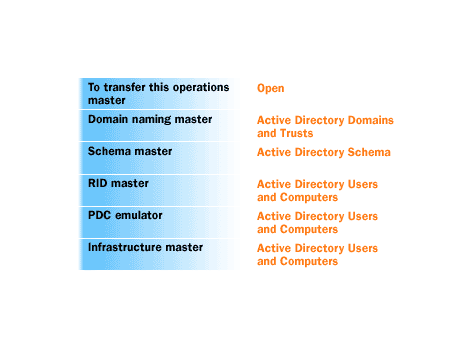
Open                                    Role
-------------------------------------------------------
Active Directory Domains and Trusts    Domain Naming Master
Active Directory Schema                Schema Master
Active Directory Users and Computers   RID Master
Active Directory Users and Computers   PDC Emulator
Active Directory Users and Computers   Infrastructure Master
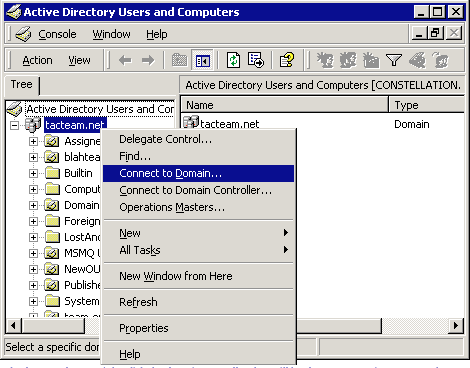
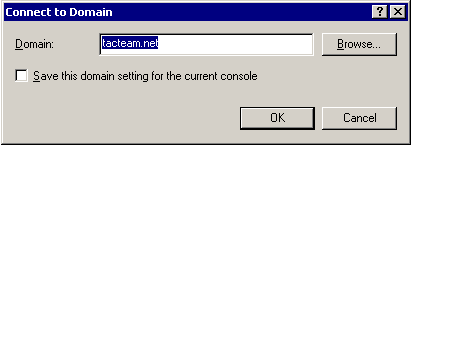
GUI Transfer Procedure
Seizing an Operations Master Role with Ntdsutil
Ntdsutil.exe is the standard command-line tool used to transfer or seize FSMO roles. When you attempt a seizure, the tool first tries to perform a transfer from the current role holder. If the current role holder cannot be contacted, the role is seized.
Minimum permissions: Domain Admins (or equivalent) is typically required. Some forest-level roles also require forest-level administrative permissions.
Minimum permissions: Domain Admins (or equivalent) is typically required. Some forest-level roles also require forest-level administrative permissions.
Procedure to Seize a FSMO Role
- Open a Command Prompt as an administrator.
- Run
ntdsutil. - At the
ntdsutil:prompt, typeroles, then press Enter. - At the
fsmo maintenance:prompt, typeconnections, then press Enter. - At the
server connections:prompt, typeconnect to server <servername>, then press Enter. - After you receive confirmation, type
quitto return tofsmo maintenance:. - Type the appropriate seize command for the role you need, then press Enter.
FSMO Role Quick Reference
| Role | Primary Function |
| Schema Master | Controls updates and changes to the extensible description of object classes and attributes stored in Active Directory |
| Domain Naming Master | Controls addition and removal of domains in the forest |
| RID Master | Allocates sequences of relative identifiers to domain controllers |
| PDC Emulator | Receives preferential replication of password changes and provides time synchronization for the domain |
| Infrastructure Master | Updates group-to-user references and maintains cross-domain object references when memberships change or objects are moved |