Define configuration methodologies used by network hosts and understand when to apply each method.
IP Configuration Methodology
Modern Windows networks support three primary methods for assigning IP addresses to hosts:
Static (Manual) Assignment - Administrator configures IP settings directly on the device
DHCP Dynamic Assignment - IP addresses are leased automatically from a DHCP server
DHCP Reservation - Specific IP addresses are reserved for particular devices based on MAC address
APIPA (Automatic Private IP Addressing) - Automatic fallback addressing when DHCP is unavailable
Each method serves different network requirements and device types. Understanding when to use each approach is essential for efficient network administration.
Static (Manual) IP Configuration
Certain network devices require static IP addresses for predictable network operation:
Infrastructure Servers - DNS servers, DHCP servers, domain controllers, and file servers
Network Devices - Routers, managed switches, firewalls, and access points
Static configuration requires manually setting the IP address, subnet mask, default gateway, and DNS server addresses. This method ensures these critical devices maintain consistent addresses that other systems can reliably reference.
When to Use Static Assignment:
Services that other devices must locate by IP address (DNS, DHCP, web servers)
Network infrastructure requiring consistent addressing for management
Devices that don't support DHCP client functionality
Security-sensitive systems where address changes could disrupt access controls
DHCP Reservations
DHCP reservations combine the convenience of DHCP with the predictability of static addressing. The DHCP server assigns a specific IP address to a device based on its MAC address, ensuring the device always receives the same IP while still being managed centrally through DHCP.
Advantages of DHCP Reservations:
Centralized Management - All IP assignments managed from the DHCP server
Consistent Addressing - Devices receive the same IP address each time
Automatic Updates - DNS servers, gateways, and other options can be updated centrally
Audit Trail - DHCP logs provide records of address assignments
Important Consideration: DHCP reservations are tied to the device's MAC address. Replacing a network interface card (NIC) changes the MAC address and invalidates the reservation. You must update the reservation with the new MAC address for the device to receive its assigned IP.
Best Practices:
Use reservations for devices requiring consistent IPs but not critical infrastructure
Document MAC-to-IP mappings for troubleshooting
Reserve addresses outside the dynamic DHCP scope to avoid conflicts
Consider using reservations for printers, conference room devices, and department servers
DHCP Dynamic Assignment
Dynamic DHCP assignment is the standard method for configuring most client devices (workstations, laptops, mobile devices). The DHCP server assigns IP addresses from a defined scope for a specified lease period.
How Dynamic Assignment Works:
Client broadcasts a DHCP Discover message when connecting to the network
DHCP server responds with a DHCP Offer containing an available IP address
Client requests the offered address with a DHCP Request message
Server confirms with a DHCP Acknowledgment, completing the lease
Lease Configuration:
Typical Lease Duration - 8 hours to 8 days, depending on network size and device turnover
Renewal Process - Clients automatically renew at 50% of lease time
Release and Renewal - Administrators can force release/renewal for configuration updates
Advantages:
Efficient use of IP address space in networks with transient devices
Reduced administrative overhead - no per-device configuration needed
Supports mobile devices moving between network segments
APIPA (Automatic Private IP Addressing)
When a DHCP-configured client cannot locate a DHCP server, modern Windows systems automatically assign themselves an address using Automatic Private IP Addressing (APIPA). This allows limited local network connectivity without administrator intervention.
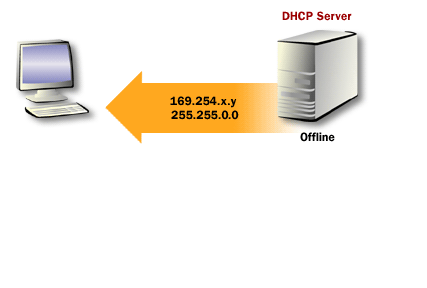
APIPA Address Range: 169.254.0.1 through 169.254.255.254 with subnet mask 255.255.0.0
The following series of diagrams illustrates the APIPA process:
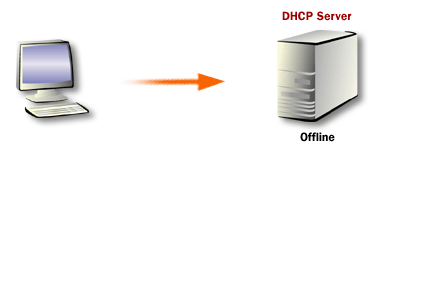
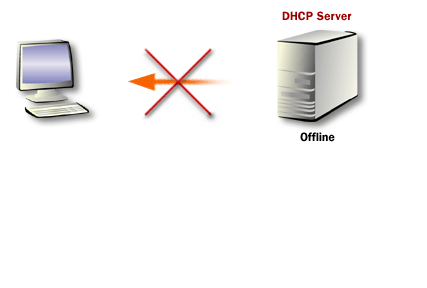
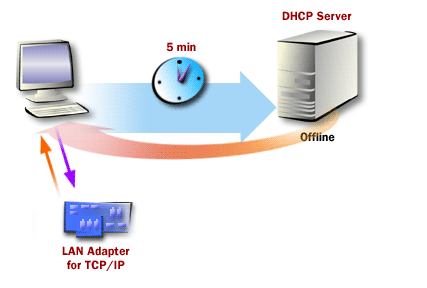
Step 1: DHCP Discovery - When Windows starts, TCP/IP attempts to find a DHCP server on the attached network to obtain a dynamically assigned IP address. Step 2: DHCP Server Unavailable - In the absence of a DHCP server, the client cannot obtain an IP address through the standard DHCP process. Step 3: APIPA Address Assignment - APIPA generates an IP address in the form of 169.254.x.y (where x.y is a unique identifier on the network) and a subnet mask of 255.255.0.0. The client issues a gratuitous ARP broadcast to detect address conflicts. If no other computer responds with that address, the client assigns it to itself. Step 4: Continued DHCP Discovery - The client computer continues to search for a DHCP server by issuing a DHCP Discover message every five minutes. When a DHCP server becomes available, the client requests a proper IP address and replaces the APIPA configuration, allowing full network participation.
APIPA Characteristics and Limitations
Key Characteristics:
Automatic Configuration - No user intervention required for basic connectivity
Link-Local Only - APIPA addresses are not routable beyond the local network segment
Limited Functionality - No default gateway, DNS, or WINS configuration provided
Continuous Discovery - Client keeps searching for DHCP server availability
Appropriate Use Cases:
Small home networks without dedicated DHCP servers
Temporary direct connections between two computers
Fallback connectivity during DHCP server outages
Ad-hoc network creation for file sharing or collaboration
Limitations:
Cannot communicate with devices on other subnets (no routing)
No Internet access (no gateway or DNS configuration)
Indicates potential network infrastructure problems if activated unintentionally
Configuring DHCP Client Behavior
To enable APIPA functionality on a Windows 10/11 or Windows Server 2019/2022 system, configure the network adapter for automatic IP addressing:
Open Network Connections (ncpa.cpl)
Right-click the network adapter and select Properties
Select Internet Protocol Version 4 (TCP/IPv4) and click Properties
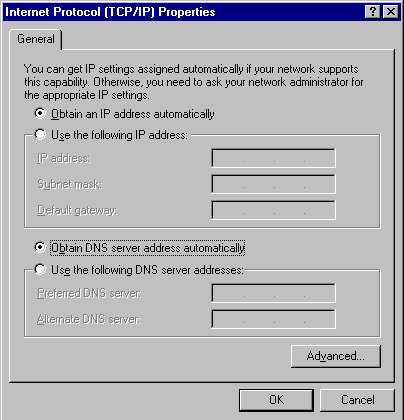
Select "Obtain an IP address automatically"
Select "Obtain DNS server address automatically"
TCP/IP Properties - Internet Protocol Properties dialog configured for automatic IP address and DNS server assignment.
Disabling APIPA
In enterprise environments, you may want to disable APIPA to ensure clients without DHCP access fail visibly rather than operating with limited connectivity. This can be configured via registry modification:
Registry Path:
Important: Disabling APIPA means clients without DHCP access will have no IP configuration and cannot communicate on the network. This is useful for troubleshooting DHCP issues as the failure becomes immediately apparent.
Apply via Group Policy for domain-joined computers
Modern Name Resolution: DNS and mDNS
Modern networks rely on DNS (Domain Name System) for name resolution rather than legacy protocols:
DNS (Primary Method):
Resolves hostnames to IP addresses across local and Internet networks
Configured automatically via DHCP or manually in static configurations
Supports both IPv4 (A records) and IPv6 (AAAA records)
Essential for Active Directory environments and Internet connectivity
mDNS (Multicast DNS):
Provides zero-configuration name resolution on local networks
Used by Apple Bonjour, Google Cast, and similar discovery protocols
Allows devices to resolve names ending in .local without DNS servers
Particularly useful in small networks or for device discovery
LLMNR (Link-Local Multicast Name Resolution):
Windows fallback protocol when DNS fails
Resolves names on the local subnet only
Should be disabled in security-conscious environments (potential for spoofing)
Note: Legacy protocols like WINS (Windows Internet Name Service) and NetBIOS are maintained only for backward compatibility with very old systems and should not be deployed in new networks.
Configuration Methodology Summary
Decision Matrix for IP Configuration:
Device Type
Recommended Method
Rationale
DNS/DHCP Servers
Static
Must have predictable addresses for service location
Routers, Firewalls
Static
Gateway addresses must remain constant
Printers, Scanners
DHCP Reservation
Predictable address, centrally managed
Workstations, Laptops
DHCP Dynamic
Mobility, automatic configuration
Mobile Devices, Tablets
DHCP Dynamic
Frequent network changes
Small Home Network
DHCP/APIPA
Automatic, no infrastructure needed
IP Configuration Methodology - Exercise
Apply your understanding of IP configuration methods to real-world scenarios. This exercise will test your ability to select appropriate configuration methodologies based on device types, network requirements, and organizational needs.